.svg)
.png)
.svg)
.svg)
.svg)


Webflow's API covers a substantial portion of what developers do repeatedly on Webflow projects — CMS operations, style management, page structure queries, publishing. The Webflow MCP server makes all of that available to Claude Code directly, turning a natural language instruction into an authenticated API call without writing a single line of boilerplate. For developers already using Claude Code in their workflow, the setup is straightforward and the payoff is immediate.
This guide covers the Webflow MCP server setup end to end — what it exposes, how to configure it, and where it fits into a production Webflow development workflow.
What the Webflow MCP server actually is
MCP — Model Context Protocol — is an open standard developed by Anthropic that defines how AI models connect to external tools and services. An MCP server exposes a set of tools the AI can call: read operations, write operations, and actions. The AI decides which tool to call based on the instruction it receives, executes it, and returns the result to the conversation.
The Webflow MCP server is Webflow's official implementation of this standard. It wraps the Webflow Data API and exposes it as a set of callable tools — sites, pages, collections, collection items, styles, assets, and publishing. Claude Code connects to it at session start and can call any exposed tool for the duration of the conversation.
The practical result: instead of writing a script to batch-update CMS collection items, or opening the Webflow Designer to adjust a class, you instruct Claude Code in plain language and the MCP server handles the API interaction.
Prerequisites
- Node.js 18+ installed
- Claude Code installed and authenticated
- A Webflow site on a paid plan with API access enabled
- A Webflow workspace with permission to generate API tokens
Webflow MCP setup
In your Webflow workspace, go to Workspace Settings → Integrations → API Access. Generate a new API token and scope it to the permissions your workflow requires. Keep the token — you will not be able to retrieve it again after leaving the page.
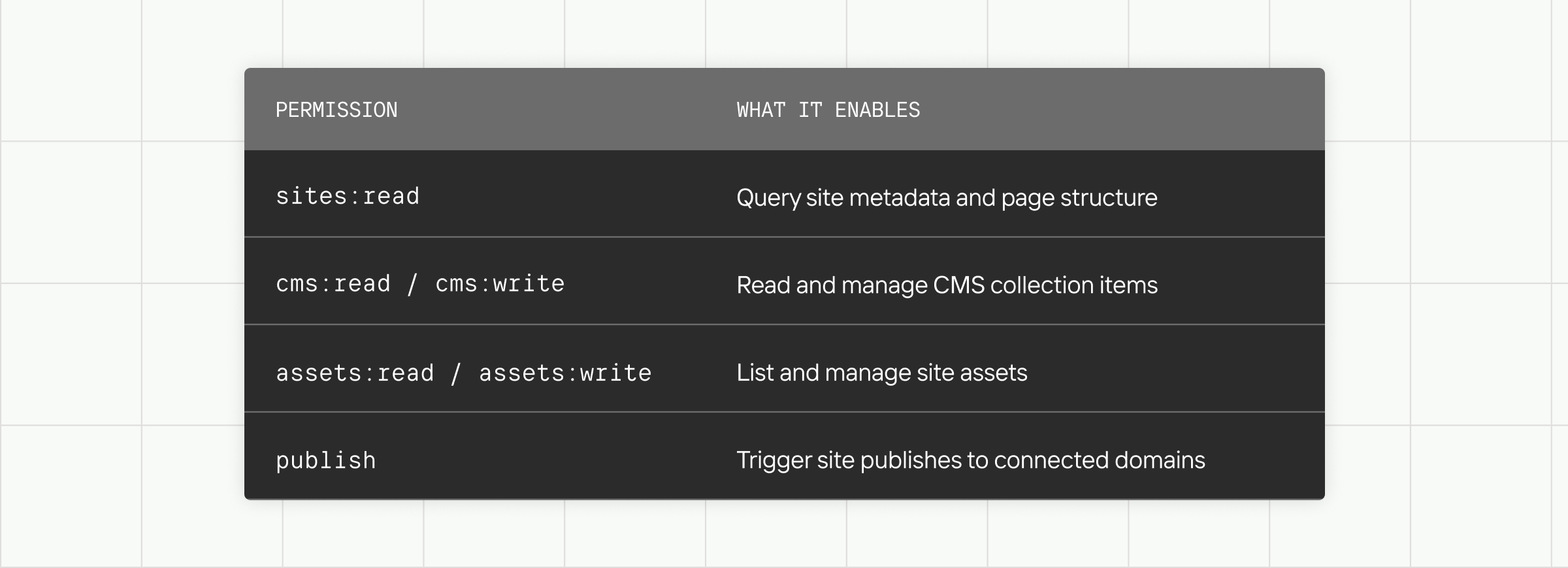
Copy the token before leaving the page — it is not retrievable afterward.
Add the MCP server entry to Claude Code's configuration file, located in your project root or in the global Claude config directory. The entry specifies the Webflow MCP server package, references your API token through an environment variable, and loads automatically when Claude Code starts.
Set the token as an environment variable in your shell profile rather than writing it directly into the config. Start a Claude Code session and ask it to list your Webflow sites. A successful response confirms the connection is live.
For full configuration options and Claude Code command reference, see the official Claude Code documentation.
What the Webflow MCP server exposes
The Webflow MCP server maps to Webflow's Data API surface. The tools available through Claude Code include:
- Sites and pages — list sites, get site metadata, list pages, get page content and structure. Useful for auditing before making changes or scripting multi-page operations.
- CMS collections and items — list collections, query items with filters, create items, update fields, delete items, and manage staged versus live content. This is the highest-value surface for most developer workflows — bulk operations that would otherwise require custom scripts or manual editing.
- Styles — read class definitions across the project. Style write operations are more limited than the Designer canvas, but read access is useful for audits and consistency checks.
- Assets — list and manage site assets, useful for automating asset inventories or cleanup operations.
- Publishing — trigger publishes for specific domains. Useful in CI-adjacent workflows where a content update should trigger a publish without manual intervention.
Claude Code and Webflow MCP — use cases in depth

CMS content operations at scale
The most immediate productivity gain from the claude code webflow combination is in CMS operations that involve volume. Webflow's Designer handles individual item editing well — it handles bulk operations poorly. Consider a common scenario: a site has 200 blog posts, and the client wants to add a new boolean field called featured to all existing items, defaulted to false. Without MCP, this means writing a Node script, authenticating against the API, paginating through the collection, and patching each item. With the Webflow MCP server connected to Claude Code, the instruction is:
- "Find all items in the Blog Posts collection and set the featured field to false on any item where it's currently empty or null."
Claude Code queries the collection, identifies the items matching the condition, batches the update requests within Webflow's API rate limits, and reports back on completion. The same logic applies to content migrations, field normalization, slug reformatting, and any operation that touches multiple items according to a rule.
For agencies managing multiple client sites, this compounds significantly. Auditing every CMS collection across a client's Webflow site for missing SEO fields — meta titles, OG images, descriptions — is a task that takes hours manually and minutes through Claude Code.

Site audits before launches and redesigns
Before a site launch or a major redesign, developers typically run through a checklist: missing meta descriptions, broken internal links, pages without canonical tags, collection items with empty required fields. Most of this is queryable through the Webflow API — which means it's queryable through the Webflow MCP server.
A pre-launch audit through Claude Code might look like:
- "List all pages on the site and identify which ones are missing a meta description or have a title tag under 30 characters."
- "Check all items in the Case Studies collection and flag any where the cover image field is empty."
- "List all pages that are currently set to noindex."
Claude Code runs each query against the Webflow MCP server, collates the results, and returns a structured report. The output can be used directly as a pre-launch checklist or exported for a client handoff document.
The same approach applies before a redesign: querying the full page and collection structure to understand what exists before touching anything. On large inherited Webflow projects — sites built by previous agencies or in-house teams without documentation — this is often the fastest way to build an accurate picture of the site's architecture.
Multi-site content synchronization
Webflow projects for larger organizations often involve multiple sites — a main marketing site, a regional variant, a separate docs site, or a staging environment that mirrors production. Keeping content consistent across sites manually is error-prone and time-consuming.
The Webflow MCP server exposes all sites associated with an API token. With the right token scopes, Claude Code can read from one site and write to another in a single session:
- "Read the latest three items from the Announcements collection on the main site and create equivalent items in the EU site collection, translating the date format to DD/MM/YYYY."
- "Check whether the Pricing page on the staging site matches the content on the production site and flag any differences in the hero heading and CTA copy."
This kind of cross-site operation previously required either a custom sync script or a third-party integration tool. Through the Webflow MCP server, it becomes a conversational task.
Publishing as part of a broader workflow
Webflow publishing is typically a manual final step — navigate to the dashboard, click publish, confirm. For teams where publishing is part of a longer workflow involving content review, stakeholder sign-off, or coordination with external systems, this manual step creates unnecessary friction.
Through the Webflow MCP server, Claude Code can trigger a publish as the final step of a larger operation:
- "Update the hero headline on the homepage to the approved copy, update the meta description to match, and publish to the production domain."
- "Set the Launch Announcement blog post status to published and trigger a site publish."
For teams managing editorial workflows — where content updates are approved in one tool and then need to be reflected in Webflow — this collapses the publish step into the same conversation as the content update.
Rapid schema exploration on inherited projects
Taking over a Webflow project from another team often means inheriting a CMS structure with little to no documentation. Understanding how collections relate to each other, which fields are actually used versus which were added and abandoned, and how the site's content model maps to the design system — this is foundational knowledge that's slow to build manually.
Through the Webflow MCP server, Claude Code can query the full schema conversationally:
- "List all CMS collections on this site and for each one, show me the field names, field types, and how many items are currently in the collection."
- "Show me all fields in the Team Members collection and identify which ones appear to be empty across more than 80% of items."
- "Describe the relationship between the Projects collection and the Case Studies collection based on their field structures."
The output gives an immediate working map of the content model — something that would otherwise require an hour of clicking through the Webflow Designer to piece together.
Asset inventory and cleanup
On long-running Webflow projects, the asset library accumulates unused images, outdated files, and duplicate uploads. The Webflow MCP server exposes asset listing through Claude Code, making inventory and cleanup operations practical:
- "List all assets in the site library uploaded before January 2025 and identify which ones are not referenced in any CMS item or page."
- "Find all PNG assets larger than 500KB and flag them for compression review."
This won't execute the cleanup automatically — deletion is a destructive operation that should involve human confirmation — but it produces the information needed to make cleanup decisions quickly, rather than scrolling through the Webflow asset panel manually.
What the Webflow MCP setup does not replace
The MCP server operates at the API layer. Complex visual design decisions, animation logic, and interactions that depend on the Webflow Designer canvas still require direct access. The Webflow MCP server is most powerful for structured, repeatable tasks — content management, style reads, publishing, and site audits. For projects that require significant design judgment, it accelerates execution but does not replace the design process that precedes it.
The MCP server is also designed for interactive use with Claude Code rather than headless CI execution. For automated pipeline operations, the Webflow Data API directly remains the more appropriate tool.
Working with a Webflow Partner agency that builds with Claude Code and MCP
Tooling decisions at the infrastructure layer — API token scoping, CMS schema design, component architecture — determine how much the Webflow MCP server can actually do on a given project. A CMS built without a clear field structure limits what bulk operations are possible. A site without a coherent component system limits what style operations are useful.
The question we ask before recommending any AI tool is where in the workflow does the most time actually get lost. The tool is never the answer by itself — the system it sits inside is.
INSAIM is a digital design and development agency working with SaaS, AI, and healthtech product teams worldwide. As a certified Webflow Partner agency, we design and build Webflow projects structured for scale — CMS architecture, component systems, and MCP-ready project structure that makes AI-assisted workflows practical rather than theoretical.
If you are looking for a Webflow agency that works at the intersection of design, development, and AI tooling, start with a conversation.
FAQ
What is the Webflow MCP server?
The Webflow MCP server is Webflow's official Model Context Protocol implementation. It exposes the Webflow Data API as a set of callable tools that Claude Code can invoke directly — enabling CMS management, page queries, style reads, asset management, and publishing through natural language instructions.
How does the Webflow MCP setup differ from using the Webflow API directly?
Using the API directly requires writing and maintaining scripts for each operation. The Webflow MCP server with Claude Code removes that requirement — you describe the operation in plain language, and Claude Code determines which API calls to make, handles pagination and error states, and returns the result. For one-off operations and exploratory queries, the MCP approach is significantly faster.
What Webflow plan is required for MCP access?
API access is available on Webflow's paid plans. CMS API access requires a CMS or Business plan or above. Check Webflow's current API documentation for plan-specific limits on collection items and API call volumes.
Is it safe to use a Webflow API token with Claude Code?
The token is stored locally in your environment and passed to the MCP server at runtime. Claude Code does not transmit the token externally beyond the authenticated API calls to Webflow. Scope the token to only the permissions the workflow requires, and rotate it if the project or team changes.
Can the Webflow MCP server be used in CI/CD pipelines?
The MCP server is designed for interactive use with Claude Code rather than headless CI execution. For automated pipeline use, the Webflow Data API directly is the more appropriate tool. The MCP server is most valuable in developer workflows where natural language instruction is the interface.